
Behringer X 32 Mixer Rack Review
Behringer X 32 Mixer – Founded by audio engineer Uli Behringer in Germany in 1989, Behringer is one of the most well-known pro-audio producers in the music industry. The most favorite and most liked thing about this product is the price which is always competitive with other manufacturers.
In 2010, Behringer launched a product known for its merging of two of the UK’s leading mixers, Midas which is renowned for its sound quality mixed with Klark Teknik console systems.
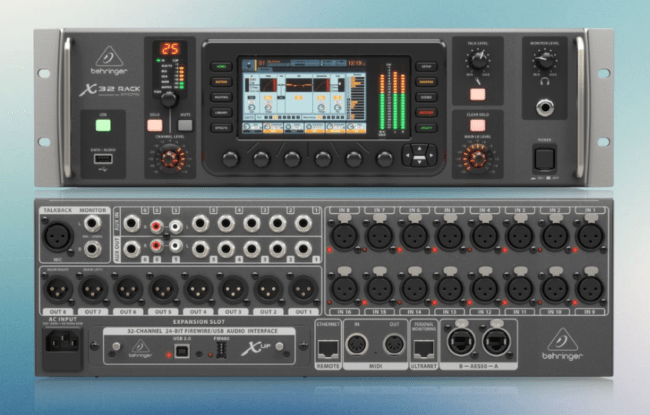
Internal Structure Behringer X 32 Mixer
At the initial start-up, Behringer X 32 Mixer is quite fast because there are some digital mixers that take a long time to start.
I will explain the basic menus from the simplest. First, there are two channel buttons in a vertical row on the left, and there are two channels. Let’s call it channel A, representing channels one through 16, and the button channel B, representing channels 17 through 32.
The fun thing is, that the Behringer X 32 adapts various modern mixers with digital principles. For example, when we increase some channel faders from one to 17 and then press it, all the faders that have been changed will automatically go down.
The next layer is the Aux/in, FX, Return, and USB buttons. Is this button like an Auxiliary for line out like a manual mixer in general? It should be underlined that this is an aux input function that is inputted from the back panel. It is commonly used to input audio signals from other media, such as playing mp3s or other audio files.
There are six auxiliary inputs of this mixer. In the second layer, still, on the same button, there is a USB channel. This channel is used to play recorded audio using a mixer with faders, which will move together because it is automatically entered into stereo mode.
Then on the third layer, there is still the FX menu, which is used to adjust some of the effects that have been added to each fader. Eight faders can be used by entering four types of effects because the use of each effect has entered the stereo menu.
How about the fourth layer on the far left? The BUS Master function, better known as the auxiliary in analog mixers, stores the auxiliary master of 16 faders.
Next is the Group 1-8 button layer, this channel is used for grouping several channels. Grouping will make it easier to use multiple channels that have been previously set up. For example, all guitar channels are stored in group one, then all microphone channels on the drums are stored in channel two.
When we want to change some frequency, we just need to press the channel. Without having to bother or be afraid there is a change in the level of each channel that we have previously balanced.
You May Like This:
In the row of layers to the right, there are buttons BUS 1-8 and BUS 1-16. Why is there another BUS in the next layer? Functionally, this button is almost the same as the left layer. The difference is that on the left layer, the master is from faders one to 16.
Meanwhile, on the right, there are only eight channels that can be continued to the next channel, by pressing the next layer on BUS 1-16. Why should there be two functions that are the same but placed in different layers? This is made with the aim of facilitating the mixing process.
Impressions
Of course, there are still so many beneficial features of the Behringer X 32 Mixer that I can’t list them all. Had this article been written by an audio engineering expert, that would have taken up a lot of pages.
I feel this mixer provides a lot of convenience for the process of combining any sound. This is also felt by friends at Burgerkill who use the Behringer X 32 in our practice studio. Of course, we feel very much helped by this mixer.
The audio performance is impressive, the functions are very comprehensive, and the navigation buttons are very intuitive and logical. The process of the operation can be a lot of fun. We often use the Behringer X 32 Mixer to record rehearsals, especially when we come up with ideas in the studio. We do this process to remember impromptu ideas that we get, or to review the new material.


